Tuesday, December 20, 2011

C Program to Perform First Come First Serve Process Sheduling


First Come First serve is a Processes scheduling algorithm in which the process which arrives first gets System Resources First.The process with the least arrival time gets the system system resources first followed by processes with higher arrival time.


Waiting Time:
The Time Process has to wait in the ready list to get the system resources for its execution


Execution Time:
The time the process requires to perform the computation.


Turn Around Time:
The Total Time the Process Requires for completion waiting time+Execution Time


The following is a C Program Source Code of a First Come First Serve algorithm implementation.The processes are scheduled according to the arrival time and finally the waiting time and turn around time of the processes are calculated.


 #include<stdio.h>  
 void main()  
 {  
  int i,ex[20],tr[20],wt[20],n,ar[20];  
  int j,k,temp,od[20];  
  float b=0,c=0;  
  printf("\n Enter the number of processes : ");  
  scanf("%d",&n);  
  for(i=0;i<n;i++)  
  {   
  printf(" P%d = ",i+1);  
  printf("\n Excecution time : ");  
  scanf(" %d",&ex[i]);  
  printf("\n Arrival time : ");  
  scanf("%d",&ar[i]);  
  }  
 for(i=0;i<n;i++)  
  od[i]=ar[i];  
  for(i=0;i<n;i++)  
  for(j=i+1;j<n;j++)  
  {  
   if(ar[i]>ar[j])  
   {  
   temp=ar[i];  
   ar[i]=ar[j];  
   ar[j]=temp;  
   }  
  }  
  for(j=0;j<n;j++)  
 {  
  for(i=0;i<n;i++)  
  {  
  if(ar[j]==od[i])  
   {   
    if(j==0)  
    {  
     wt[i]=ar[j];  
     b=wt[i];  
     tr[i]=ex[i];  
     c=tr[i];  
     break;  
    }  
    wt[i]=temp-ar[j]+ar[j-1];  
    b=b+wt[i];  
    tr[i]=ex[i]+wt[i];  
    c=c+tr[i];  
    break;  
   }  
  }  
  temp=tr[i];  
 }   
  b=b/n;  
  c=c/n;  
  printf("\n ORDER NAME ARRIVAL-TIME EX.TIME WAITING-TIME TURN-AROUND-TIME \n");  
  for(j=0;j<n;j++)  
  for(i=0;i<n;i++)  
  {  
  if(ar[j]==od[i])  
  {  
  printf("  %d  P%d\t %d      %d\t   %d\t\t  %d ",j+1,i+1,ar[j],ex[i],wt[i],tr[i]);  
  printf("\n");  
  break;  
  }  
  }  
  printf("Average waiting time = %f \n Average turn around time = %f \n",b,c);  
 }  


Saturday, December 10, 2011

What is Abstraction?The Concept of Abstraction Simplified.


What is Abstraction in Object Oriented Programming?
Abstraction can be formally defined as the representation of an object including the specification of that object in a certain context.Abstraction is a powerful means to tackle the complexity of programming by wrapping up and thus reducing the complexity of complex operations.

Abstraction is used in OOP(Object Oriented Programming) Languages like Java,C++ etc.These OOP Languages employ an abstract entity called class from which instance of that class called object can be created.Data and Code are Binded together in a syntactic container called Object.

These statements can be little confusing for beginner's so read the rest of the post to get a better view of abstraction.


Abstraction Defined in a Simple way :

The concept of abstraction is a little confusing of beginner's.

To understand the concept of abstraction easily consider a cactus which has lots of spines placed in box.You can easily carry the box without knowing that a cactus is in it.But it is difficult to carry the cactus with bare hands.Thus Abstraction serves as a box to wrap up the complexities.


In programming subprograms are examples of abstractions,as they can be used to perform a function without knowing the internal details.eg: a function named add(int a,int b) can be used to add two integers and produce a result by simply using the code add(1,2) in the program.The internal details of the function that performs addition is not known to the programmer or to the main program.These details are abstracted and this provides a higher level view.


Abstraction simplifies programming as the programmer needs to focus only on the task he has to perform rather that the internal details of the program.Abstraction are provided in Libraries(.dll) for different operations.

Abstraction is implemented commonly in programming languages by using an data type called class.Objects are Instances of a class 

eg:Car is a class Audi,Mercedes etc are Objects of the class named car


 Each Object is an a clone of the an abstraction(class),it posses all the traits of class eg:Mercedes and Audi are two brands of cars but they posses all the characters of a the main class car.Thus they are Objects created from the Abstraction Car.The term Car is used to Abstract or wrap up the internal details like engine,wheels,brakes etc in a single container  named car.


Data Hiding is a Concept of Abstraction by which the Code and the Data in an Object(Instance of an Abstract Data type usually referred to as class) is hidden from the external entities. 

Saturday, December 3, 2011

Round Robin Process Sheduling Algorithm and Example Source Code in C

Round robin is the most widely used process scheduling algorithm .The basic strategy for round robin scheduling is that if there are n process,each of the process will receive 1/n CPU Execution Time.Each process is allotted a  time quanta, for which its is executed.The incoming processes are kept in a ready list while another one is executing.If the time quanta allotted for a process is over,then that process is moved to ready and the next process in the ready list is executed for the allotted time quanta.The Complete Example Implementation Source Code in C of Round Robin Algorithm to schedule N Processes and to calculate the Execution,wait time and turn around time is given below.
 #include<stdio.h>  
 void main()  
 {  
  int n,i,k,x=0,s=0,r=0,q=0,x=0,a[30],e[30],t[30];  
  float m,p=0;  
  printf("Enter the number of process:");  
  scanf("%d",&n);  
  printf("Enter the execution time:");  
  for(i=0;i<n;i++)  
  {  
  scanf("%d",&a[i]);  
  e[i]=a[i];  
  }  
  printf("Enter the quanta:");  
  scanf("%d",&q);  
  printf("After round robin sheduling:");  
  for(i=0;i<n;i++)  
  {  
  if(x<a[i])  
  {  
   x=a[i];  
  }  
  }  
  k=x/q;  
  while(s<=k)  
  {   
  for(i=0;i<n;i++)  
  {  
   if(a[i]>0)  
   {  
   if(a[i]>q)  
   {  
   r=r+q;  
   a[i]=a[i]-q;  
   printf("P%d\t",i+1);  
   }  
  else  
  {  
   r=r+a[i];  
   a[i]=a[i]-q;  
   printf("P%d ",i+1);  
   t[i]=r;  
  }  
  }  
 }  
 s++;  
 }  
 printf("\nPROCESS EXECUTION TIME  WAIT TIME  TURN AROUND TIME\n");  
 for(i=0;i<n;i++)  
 {  
  printf(" %d \t\t %d\t\t %d\t\t %d\t\t \n",i,e[i],x,t[i]);  
  x=x+q;  
 }  
 m=x/n;  
 printf("Average waiting time=%f",m);  
 printf("Average turn around time=");  
 for(i=0;i<n;i++)  
 p=p+t[i];  
 p=p/n;  
 printf("%f",p);  
 }  

Thursday, December 1, 2011

How to create Self Extracting Executable using iexpress wizard


Windows has an inbuilt utility called iexpress that can be used to create self extracting archives or executables.IEXPRESS is used for the creation and distribution of self extracting exectables or setups or Packages.
Iexpress can be used easily to create your own setup or self extracting file that extracts and runs the desired program .Following is a step by step instructions for creating self extracting executable using the iexpress wizard.

  • Go to run type in iexpress.exe


  • The iexpress wizard will open up,where you need to configure your setup or self extracting executable


  • Select create a new self extracting directive as you are creating a new self extracting archive once your setup is configured you can save the SED( self extracting directive)

  • Now select the type of Self Extracting Executable from the next iexpress windows,Select the Option 'Extract Files Only'.You can try out other options later.


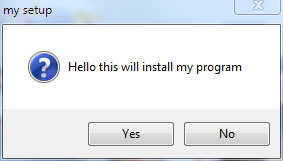
  • Enter the Title eg: my setup

  • Enter the Welcome Message

  • Choose if you want to display a license before the installation,This will be shown before the installation begins.Text files can be used for this purpose.


  • Then add the required files that should be installed or extracted by the self extracting executable.I add some photos then proceed to  the next step.


  • In the next Window select the style of the setup

  • Enter the Message to show after extraction is complete 

  • Choose the Path to save the Self extracting executable or the Package that you are about to create
  • Choose if you want to save the configuration as a SED file for future use


  • Wait for the Creation to complete.


  • All Done!Open your own self extracting executable created with iexpress


Tuesday, November 29, 2011

Is your Cloud Secure?Security Vulnerabilities Discussed


With the rise of cloud computing users can seamlessly share data among different devices with ease.There are a number of cloud services available now as the enterprise or personal demand for effective data storage has increased. Users easily switch to or avail cloud services without thinking much about the security issues involved in the cloud.


Is your confidential data stored in the cloud secure? How vulnerable is your data cloud?


I'm trying to  address these two issues in this article


Security:


There are Possibilities of virus or malware infections even-though the cloud is equipped with Anti-Mal ware and Antivirus Technologies.As you may or will be sharing the hardware used by another user to access your data there are possibilities of external attacks focusing on this cloud characteristic.There are many formats of files uploaded to cloud there are chances that a file downloaded may be infectious because the cloud Antivirus may be outdated.
A cloud is based on mainly 3 components WebApplications and Services,Cryptography(layer) and the  virtualization technique used to give you the feeling that you are using your own system.These basic components have their own security vulnerabilities.


Stability and Integrity:
You give all your valuable data to a company and one day they say that that are going to close down.What will you do?You will say that i will take a backup,but if it is a sudden problem and all your data is lost?


You cannot rule out such possibilities even though slim.So you cannot trust any cloud provider 100%.Cloud Severs requires high computing power and high Up time in order meet your requirements ,it may not be met on all situations.


How to Reverse a Video Quickly and Easily with Virtual Dub


Have you watched Videos being played from from the end to start ie:In a Reversed Manner in Movies.
eg:cars going backwards .Some of You might be Wondering how to do this? You can easily Reverse a Video and make it playback from the end point to start  in a reversed manner.This Tutorial will teach you ,how to reverse a video easily without any costly video editing tools.


Before starting, You need some free Tools Virtual Dub -A free video editor for editing and encoding  and AviSynth(A Script based utility used for Video Editing)


Download Virtual Dub from www.virtualdub.org


Download AviSynth from www.avisynth.org


Extract the Archive containing Virtual Dub to a required folder and then install AviSynth using the Setup provided.


Following are step by step Tutorial to reverse a Video using Virtual Dub and Avisynth
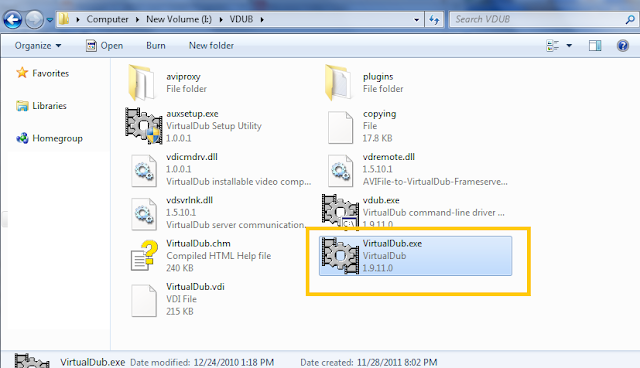
  • After Installing Virtual Dub and Avi synth,Open Virtual Dub( Virtual Dub.exe)


  • Open the Video which you want to reverse by  going to File>Open Video File
  • Go to Video>Compression and a dialog will open up asking you to select a Video Codec,You will have to save the video without any compression in order to reverse it.So,select 'Uncompressed RGB/YCbCr"


  •  Click on OK,Then you will have to save a copy of this uncompressed video.To do that go to File>Save as AVI,then save the copy by giving a new file name,in my case I'm  giving the name as 'Reverse.avi'
  • Click on Save,Dialog box will open up giving the progress of the video Rendering wait for it to complete
  • After Completion  go to the folder that you have placed the Uncompressed video(Reverse.avi) and Create a New Text File(.txt) in that folder and enter the following line into it
       AviSource("Your Video File Name").Reverse()
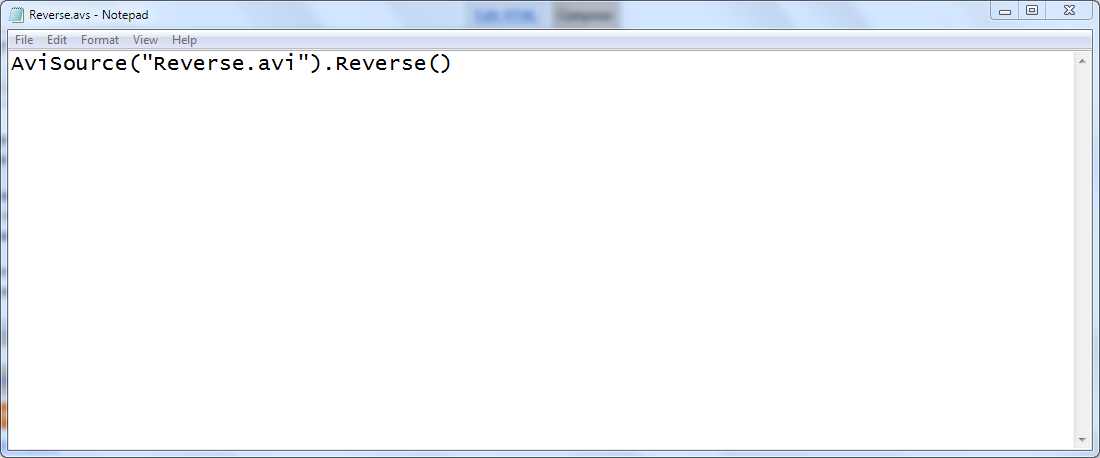
       In my case,since i have saved the video with the name Reverse.avi,i enter the following line to the text file        AviSource("Reverse.avi").Reverse()
        This Serves as the Script for Avisynth for reversing the Video
  • Save this Text document with same name of the Video with .avs extension ,in my case i save it as 'Reverse.avs' in the same folder which has the uncompressed video file ('Reverse.avi') which requires the reversing effect to be applied.
  •  Now,Open Virtual Dub and Go to File>Open Video File and Open this .avs file(Reverse.avs) .The Video will open Up.

  • In order to apply reverse effect ,Got to File>Save as Avi,Give the name for the Reversed Avi file and Click on Save,Wait for the rendering to complete.Once done open the newly created Video file and see the magic, the video will be played from end to start ie:it will be reversed.
Note:The Uncompressed Video file will be of large size ,you can reduce the size of the Reversed Video by Opening Virtual Dub and Going to Video>Compression and selecting the desired compression codec,say XVID.If you are unable to open the video file in Virtual Dub due to some codec issues Download the Klite Codec Pack http://www.free-codecs.com/download/k_lite_codec_pack.htm and Install it.

                        If you like This Article Please Comment on it.

Thursday, November 24, 2011

The Unsolved 'This is Not a True Type Font' Exception in C# Revealed and the Final 'SOLUTION'

Almost all Forums have a Discussion relating to 'Only true type fonts are Supported.This is not a true Type Font' Exception thrown in C#/.NET when a non true type font or a true type font with invalid metadata is selected from a Font Dialog.
This exception occurs because GDI+ Only supports True Type fonts. Modern/open type fonts are  not Supported by C#.Open Type fonts has been created by merging the old True Type and PostScript Fonts, as the result the Open type font may have a true type or postscript specification.

Although the Font Dialog control was designed to filter out these Non True Type fonts by using ChooseFont() API call with the CF_TTONLY option ,some Fonts may represent or call themselves as true type fonts.These are the Fonts with bad/Invalid MetaData that causes the Exception.

The Solution???
Unfortunately there is NO SOLUTION,I have found articles on the web giving the following solutions these include
  • Setting FontDialog.AllowSimulations property to false.
  • Setting FontDialog.AllowScriptChange property to false
These don't solve the Problem,A person had reported this bug to MicroSoft and here is their Reply:


Posted by Microsoft
This is a GDI+ issue and no changes are planned to that code base, therefore we cannot fix this bug. 
Posted by Microsoft
The Microsoft Sub-status is now "Investigating" 
Posted by Microsoft 
Note to customer: This only seems to be an issue at design time. You *can* set the font to VisualUI at runtime. We will continue looking into this from the designer perspective. 
Posted by Microsoft
Thanks for reporting this bug, we have been able to repro this issue and are investigating. 
Posted by Microsoft
The Microsoft Sub-status is now "Reproduced"
Thanks for reporting this bug, we have been able to repro this issue and are investigating.


This was Reported in 2005 and there is not a solution yet.The only Solution that i can offer is designing your own custom font picker or font selector that displays only true type fonts using the FontFamily class that returns only valid true type fonts. 
See these links to get started
Custom Font Dialog in WPF
Color and Font Selector Project hosted at Code Project
So,these are the currently available solutions to the Invalid Font Problem of the Font Dialgo control in C#.
Comments are always appreciated.

Which is the Best Photo Watermarking Software

Photo Theft is becoming more and more common in the web with the outburst of social websites like Facebook,Google Plus and Image sharing se...