Showing posts with label Java. Show all posts

Thursday, August 30, 2012

Java Program to Write Lines of Text to a File + Source Code

To learn the Basics of file manipulation in java ,the best way to start is by writing simple code to write some text to file.The following is a sample program that writes text to file using BufferedWriter Class

It uses the File Class to open the File to the BufferedWriter Class,which writes some sample text to the file.The main class used is the Writer Class intended for writing stream data to files.

Below is the complete source Code to implement a Simple File Writer in Java


 import java.io.*;  
 public class FileWriter {  
  public static void main(String[] args)throws IOException{  
  String towrite = "Hello World";  
  Writer data = null;  
  File file = new File("myfile.txtt");  
  data = new BufferedWriter(new FileWriter(file));  
  data.write(text);  
  data.close();  
  System.out.println("Text Written");   
  }  
 }  

Wednesday, August 8, 2012

How to set the Java Compiler path for direct running from command Line

There is an easy way to set the Java Compiler Path(javac.exe) and Java Interpreter path(java.exe)without typing long lines of command.

The following are steps to set the JDK(Java Development Kit) path easily

1.Click on Start

2.Right Click on Computer>Properties

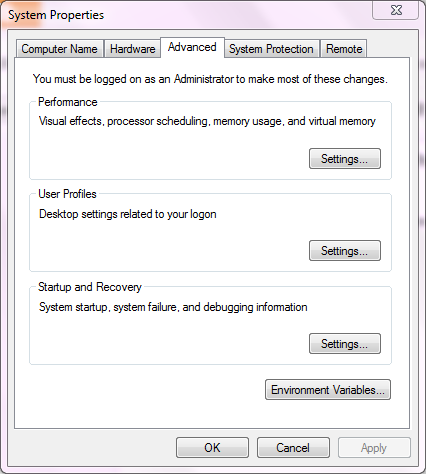
3.Click on Advanced System Settings

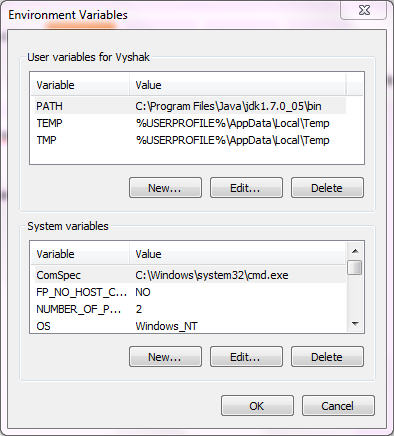
4.Click on Environmental Variables Button


5.Click on New


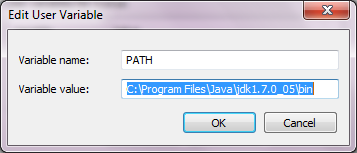
6.In the variable name field type PATH


7.In the variable value field enter the path in which JDK is installed (usually C:\Program Files\Java\jdk1.7.0_05\bin),include the bin folder.

8.Click on OK

9.Open CMD and type javac.exe or java.exe or the name of any executable,it will be launched.

See the video tutorial for more information


Friday, July 27, 2012

Simple Pencil Sketch Java Applet Example+Source Code


Java Applets are easy to Implement Web Programs that can be run on the browser without any installation or downloads. The only requirement is that Java Virtual Machine(JVM) Should be installed on the END User Machine. As you may know Java Applets are OS Independent it can be run on any system supporting Java.
Simple Pencil Sketch Applet in Java
The following is a simple Java Example Applet that draws Lines when a user clicks and Drags the mouse.
It uses mouseMoved, mousePressed events to Track mouse clicks by using the MouseAdapter Motion Listener Class.The following is the screenshot of the Applet


The following is the complete Example Source code for the Pencil Sketch Java Applet
 import java.applet.*;  
 import java.awt.event.*;  
 import java.awt.Graphics;  
 import java.awt.Color;  
 //<applet code=LineDraw.class width=400 height=300> </applet>  
 public class LineDraw extends Applet implements MouseMotionListener  
 {int x1,y1,x2,y2;  
  boolean flag=false;  
 public void init()  
 { x1=0; y1=0;  
  addMouseMotionListener(this);  
  addMouseListener(new MouseAdapter(){  
  public void mousePressed(MouseEvent ME)  
  { x1=ME.getX(); y1=ME.getY();}  
  }  
  );  
 }  
 public void mouseMoved(MouseEvent ME)  
 {showStatus(ME.getX()+","+ME.getY()); }  
 public void mouseDragged(MouseEvent ME)  
 {  
  Graphics g=this.getGraphics();  
  x2=ME.getX();  
  y2=ME.getY();  
  g.drawLine(x1,y1,x2,y2);  
  x1=x2; y1=y2;  
  }  
 }  

Tuesday, May 22, 2012

Program to Implement Selection Sort in Java+Explanation


Selection sort is said to be an efficient algorithm when considering small computations involving limited memory/resource but it is quite inefficient when compared to other techniques when huge computations are required.Selection sort is said to be efficient for small list of items because of its simplicity.

The following steps Explains the working of the Selection sort Algorithm


  1. Obtain the Item with the Minimal value from a List/Collection of items
  2. Swap the item with the Item in the first position of the Collection/List
  3. Repeat the Process for the rest of the Items in the Collection


The Following is the Complete Program Source Code in Java for Implementing Selection Sort Algorithm
 import java.io.*;
import java.lang.*;
class array
{
 DataInputStream get;
 int a[];
 int i,j,n;
 void getdata()
 {
 try
  {
   get=new DataInputStream(System.in);
   System.out.println("Enter the limit");
   n=Integer.parseInt(get.readLine());
   a=new int[n];
   System.out.println("Enter the elements in the array");
   for(i=0;ia[j])
   {
    temp=a[i];
    a[i]=a[j];
    a[j]=temp;
   }
  }
 }
 System.out.println("Elements in ascending order is:");
 for(i=0;i=0;i--)
 System.out.print(" "+a[i]);
 }
}
class selectionsort
{
 public static void main(String arg[])
 {
  array obj=new array();
  obj.getdata();
  obj.sorting();
 }
}

Sunday, May 13, 2012

Quick Sort Program in Java -Explanation+Complete Source Code

Quick-sort is a sorting technique commonly called divide and conquer algorithm. Quick-sort first divides a large array of items into two smaller arrays : the low items and high items(ie:all elements in first array is less than all elements in second). 
Quick sort algorithm involves three steps
  1.  An n element, called a pivot is picked from the array.Pivot is commonly the middle element of the array
  2. Rearrange the array elements such that all elements less than the pivot come before the pivot and all elements greater than the pivot come after the pivot,this step is called array partitioning
  3. Then a recursive sorting of the partitioned arrays is done individually
Following is the complete source code for Quick-sort program in Java.

 import java.io.*;  
 import java.lang.*;  
 class array  
 {  
//c-madeeasy.blogspot.com
  DataInputStream get=new DataInputStream(System.in);  
  int a[];  
  int i,n,h,l;  
  void getdata(int n,int x,int y)  
  {  
  try  
  {  
   a=new int[n];  
   System.out.println("Enter the elements");  
   for(i=0;i<n;i++)  
   a[i]=Integer.parseInt(get.readLine());  
  }  
  catch(Exception e)  
  {  
   System.out.println(e.getMessage());  
  }  
  l=x;  
  h=y;  
  }  
  void sort(int l,int h)  
  {  
  int temp,key,low,high;  
  low=l;  
  high=h;  
  key=a[(low+high)/2];  
  while(low<=high)  
  {  
   while(key>a[low])  
   {  
   low++;  
   }  
   while(key<a[high])  
   {  
   high--;  
  }  
  if(low<=high)  
   {  
   temp=a[low];  
   a[low]=a[high];  
   a[high]=temp;  
   low++;  
   high--;  
   }  
   }  
   if(l<low-1)  
   {  
   sort(l,low-1);  
   }  
   if(low<h)  
   {  
   sort(low,h);  
   }  
  }  
  void display(int n)  
  {  
  System.out.println("Asending order is");  
  for(i=0;i<n;i++)  
  System.out.println(" "+a[i]);  
  }  
  }  
  class quicksort  
  {  
  public static void main(String arg[])  
  {  
   array obj=new array();  
   DataInputStream get=new DataInputStream(System.in);  
   int n,x,y;  
   n=0;  
  try  
   {  
   System.out.println("Enter the limit");  
   n=Integer.parseInt(get.readLine());  
   }  
  catch(Exception e)  
   {  
   System.out.println(e.getMessage());  
  }  
  x=0;  
  y=n-1;  
  obj.getdata(n,x,y);  
  obj.sort(x,y);  
  obj.display(n);  
  }  
  }  

Wednesday, March 14, 2012

Java Program -1 way Client-Server Communication using TCP/IP


In java Networking is done using Sockets and ServerSockets.To get a good idea of how sockets are used in java for creating a client server model see the article. http://c-madeeasy.blogspot.com/2012/03/concept-of-sockets-and-networking-in.html

TCP/IP(Transmission Control Protocol/Internet Protocol) :
Is connection based protocol that is widely used over the internet.It is commonly referred to as IP.The following program uses TCP/IP to communicate.


After reading the above article,see the code below.You can see how socket and server sockets are used to create a one way client server program.Here a client can communicate with the server only.Both are DOS/Terminal Java Programs.

Fist you start the server program followed by client program in two separate terminals.In the client terminal type anything,you can see that appearing in the server terminal window.

The complete Java Program source code to implement 1 way client and server model is provided below as two separate programs Client.java and Server.Java

 //Server Program  
 //c-madeeasy.blogspot.com www.codeuniverse.tk  
 import java.io.*;  
 import java.net.*;  
 class server{  
 public static void main(String []args)  
 {  
 String data;  
 ServerSocket ssock;  
 Socket clientsock=null;  
  DataInputStream is;  
 try{  
 ssock=new ServerSocket(2000);  
 System.out.print("Server Started");  
 clientsock=ssock.accept();  
 is=new DataInputStream(clientsock.getInputStream());  
 System.out.println("Connection Accepted");  
 while(true)  
 {  
 data=is.readLine();  
 System.out.println(data);  
 }  
 }  
 catch(Exception e)  
 {  
 System.out.println("ERROR");  
 }  
 }  
 }  
 ---------------------------------------------------------------  
 //Client Program  
 import java.io.*;  
 import java.net.*;  
 class client{  
 public static void main(String []args)  
 {  
 String text;  
 Socket sock=null;  
  DataOutputStream dout;  
  PrintStream sender;  
  DataInputStream keyboardreader;  
  System.out.println("Connecting to Server.....");  
  try{  
   sock=new Socket("localhost",2000);  
   }  
  catch(Exception e)  
  {  
  }  
  try{  
  System.out.println("Connected");  
  keyboardreader=new DataInputStream(System.in);  
  sender=new PrintStream(sock.getOutputStream());  
  do  
  {  
  text=keyboardreader.readLine();  
  sender.println(text);  
  }while(!text.equals("quit"));  

Friday, March 9, 2012

The Concept of Sockets and Networking in Java Simplified

Socket:
A socket is one end-point of a two-way communication link between two programs running on the network.java.net Package provides support for sockets. Socket classes can be used to implement the connection between a client program and a server program.

ServerSocket:
ServerSocket class is exclusive for the Server side implementation of the client-server model.


 Java programming with Socket class allows easy implementation of a client-server model for one way or two way communication. We can easily implement a simple one way client server model,2 way client server model,a broad cast server,a multicast server using Sockets and Server Sockets in Java. 

                                                                      courtesy:oracle

Client Side
 Basically a socket can used in a client to send message it involves creation of socket by using the code


Socket mysocket=new Socket(localhost,2000)


Here a socket is created in the local machine itself you can specify the
ip address of the server machine instead of localhost.

Server Side


In the Sever Side a ServerSocket is created.ServerSocket is a different
class rather than socket.It is meant for the server side only.
In the server side the following code is usually used


ServerSocket ssock=new ServerSocket(2000)


As you can see the same port number should be used in the client and server side.

Classes like PrintStream is used to send message from the client to the server.It is established easily like this

PrintStream ps=new PrintStream(mysocket.getOutputStream)
ps.println("my message");

This code in the client side sends message to the server.In the server 
side this message can be easily accepted and displayed using the 
following code

ServerSocket ssock=new ServerSocket(2000)
Socket mysocket=ssock.accept()
DataInputStream d=new DataInputStream(mysocket.getInputStream)
String msgfromserver=d.readLine() 
System.out.println(msgfromserver)


The method accept() is used to accept a connection from the client.Note that you need to surround the statements with a try-catch block to handle all the exceptions.
In this way you can send a message from the client to server.


Monday, August 29, 2011

How to Develop Android Applications Using Eclipse IDE

Eclipse is a common Integrated Development Environment  acting as a platform to develop applications with GUI's.Eclipse IDE is also available for Java, for developing Java Applications.Since Android is an Operating System with Java Programming Interface ,applications for Android are mostly Coded in Java.In this Post i will show you how to Configure Eclipse for Developing Android Applications.

  • Enter this URL https://dl-ssl.google.com/android/eclipse/ or http://dl-ssl.google.com/android/eclipse/ into the text box corresponding to the works with label..


  • Wait for the Plugins to be listed ,Check the Boxes ,Click on Next.
  • Wait for the Installation to be completed.Done!Your IDE is ready for developing android apps. 


Java Program to Check whether a Expression is Valid using Stack

The Program given below can be used to check whether a given mathematical expression is valid or invalid.The Validation procedure is based on the presence of complementary opening and closing braces.This implementation makes use of stack to push and pop out opening and closing brackets to the stack, as they are encountered in the Expression String.This program pushes opening brackets to the stack and pops out closing braces,checking whether the complementary brace is present at the top of the stack.Finally if the stack is empty the Expression is valid else the Expression is Invalid.

sample Output:
Enter the string
(a+b)-c
Valid Expression

Enter the string
(a+b-c
Invalid expression
The Complete Source Code is Provided below
 import java.io.*;  
 import java.lang.*;  
 class array  
 {  
  DataInputStream get=new DataInputStream(System.in);  
  int n,i,top=0,f=0;  
  char a[];  
  String str;  
  void getdata()  
  {  
  try  
   {  
   a=new char[30];  
   System.out.println("Enter the string");  
   str=get.readLine();  
   n=str.length();  
  }  
  catch(Exception e)  
  {  
   System.out.println(e.getMessage());  
  }  
  }  
  void push(char c)  
  {  
   a[top]=c;  
   top++;  
  }  
  char pop()  
  {  
   char h;  
  if(top!=0)  
   {  
   top--;  
   h=a[top];  
   return h;  
   }  
  else  
  return 0;  
  }  
  int stempty()  
  {  
   if(top==0)  
   return 1;  
   else  
   return 0;  
  }  
  void operation()  
  {  
  char d,t;  
  for(i=0;i<n;i++)  
   {  
   d=str.charAt(i);  
   switch(d)  
     {  
     case '(':  
         {  
          push(d);  
          break;  
         }  
     case '{':  
         {  
          push(d);  
          break;  
         }  
     case '[':  
         {  
          push(d);  
          break;  
         }  
     case ')':  
         {  
          t=pop();  
          if(t!='(')  
          f=1;  
          break;  
         }  
     case '}':  
         {  
          t=pop();  
          if(t!='{')  
          f=1;  
          break;  
         }  
     case ']':  
         {  
          t=pop();  
          if(t!='[')  
          f=1;  
          break;  
         }  
     }  
     }  
  if(f==0&&top==0)  
  {  
   System.out.println("Valid Expression");  
  }  
  else  
   System.out.println("Invalid expression");  
  }  
 }  
 class validexp  
 {  
  public static void main(String arg[])  
  {  
   array obj=new array();  
   obj.getdata();  
   obj.operation();   
  }  
 }  

Sunday, August 28, 2011

Java Program to Perform Linear Search

Linear Search is a Sequential Searching algorithm, it is commonly used to find an element in an array.It works by checking whether each element in the array is equal to the element to be found.This done by Incrementing the Index of the array.If the element is found a flag variable is set to indicate the presence of the element and the index of the array ,where the element is found is reported.The Complete Source Code to implement Linear Search in java is provided below.
 import java.io.*;  
 import java.lang.*;  
 class Linear  
 {  
 DataInputStream get;  
 int a[];  
 int key,n,i;  
 void getdata()  
 {  
  try  
  {  
   get=new DataInputStream(System.in);  
   System.out.println("Enter the size");  
   n=Integer.parseInt(get.readLine());  
   a=new int[n];  
   System.out.println("Enter the elements");  
   for(i=0;i<n;i++)  
   a[i]=Integer.parseInt(get.readLine());  
   System.out.println("Enter the key element");  
   key=Integer.parseInt(get.readLine());  
  }  
  catch(Exception e)  
  {  
   System.out.println(e.getMessage());  
  }  
 }  
 void search()  
 {  
 int flag=0,j,i;  
 int pos[]=new int[10];  
 for(i=0,j=0;i<n;i++)  
  {  
  if(key==a[i])  
  {  
   flag=1;  
   pos[j]=i+1;  
   j++;  
  }  
  }  
 if (flag==1)  
 {  
  System.out.println("Element is found in position:");  
  for(i=0;i<j;i++)  
  System.out.print(pos[i]+" ");  
 }  
 else  
  System.out.println("Element not present in this array");  
 }  
 }  
 class Linearsearch  
 {  
 public static void main(String arg[])  
 {  
  Linear obj=new Linear();  
  obj.getdata();  
  obj.search();  
 }  
 }  

Wednesday, August 24, 2011

Java Program to Perform Infix to PostFix Conversion

The Program given below Converts an Infix Expression to Post Fix Expression.For eg: ((l+i)*n-(o-p)^(q+p)) would be Converted to li+n*op-qp+^- .The Complete Source Code is Provided Below
 import java.lang.*;   
 import java.io.*;
  class array   
  {   
  DataInputStream get=new DataInputStream(System.in);   
  int n,i,top;   
  char s[],a[];   
  String str;   
  void getdata()   
  {   
  try   
   {   
   System.out.println("Enter the expression:");   
   str=get.readLine();   
   n=str.length();   
   s=new char[40];   
   a=new char[40];   
  }   
  catch(Exception e)   
  {   
   System.out.println(e.getMessage());   
  }   
  top=0;   
  }   
  void push(char c)    
  {   
   s[top]=c;   
   top++;   
  }   
  char pop()   
  {   
   char h;   
  if(top!=0)   
   {   
   top--;   
   h=s[top];   
   return h;   
   }   
  else   
   return 0;   
  }   
  void operation()   
  {   
  int j=0;   
  char d=0;   
  char t;   
  for(i=0;i<n;i++)   
   {   
   t=str.charAt(i);   
   switch(t)   
    {   
    case'^':   
      {   
      push(t);   
      break;   
      }   
    case '(':   
      {   
      push(t);   
      break;   
      }   
    case '{':   
      {   
      push(t);   
      break;   
      }   
    case '[':   
      {   
      push(t);   
      break;   
      }   
    case ')':   
      {   
      while((d=pop())!='(')   
      {   
       a[j++]=d;   
      }   
      break;   
      }   
    case '}':   
      {   
      while((d=pop())!='{')   
      {   
       a[j++]=d;   
      }   
      break;   
      }   
    case ']':   
      {   
      while((d=pop())!='[')   
      {   
       a[j++]=d;   
      }   
      break;   
      }   
    case '+':   
      {   
      if(s[top]=='/'||s[top]=='*'||s[top]=='^')   
      {   
      a[j++]=pop();   
      }   
      push(t);   
      break;   
      }   
    case '-':   
      {   
      if(s[top]=='+'||s[top]=='/'||s[top]=='*'||s[top]=='^')   
      {   
       a[j++]=pop();   
      }   
      push(t);   
      break;   
      }   
    case '*':   
      {   
      if(s[top]=='^')   
      {   
       a[j++]=pop();   
      }   
      push(t);   
      break;   
      }   
    case '/':   
      {   
      if(s[top]=='^'||s[top]=='*')   
      {       
       a[j++]=pop();   
      }   
      push(t);   
      break;   
      }   
    default:   
      a[j++]=t;   
    }   
   }   
   while(top!=0)   
   {   
   if(s[top]!='(')   
   {   
    a[j++]=pop();   
    }   
   }   
    System.out.println("The postfix expression is:");   
    for(i=0;i<j;i++)   
    System.out.print(a[i]);   
  }   
  }   
  class postcon   
  {   
  public static void main(String arg[])   
  {   
  array obj=new array();   
  obj.getdata();   
  obj.operation();   
  }   
  } 

Friday, August 19, 2011

Java Program to Impliment Circular Queue

The Java Source Code given below can be used to Implement a Circular Queue.
 import java.io.*;  
 import java.lang.*;  
 class clrqueue  
 {  
  DataInputStream get=new DataInputStream(System.in);  
  int a[];  
  int i,front=0,rear=0,n,item,count=0;  
  void getdata()  
  {  
  try  
   {  
   System.out.println("Enter the limit");  
   n=Integer.parseInt(get.readLine());  
   a=new int[n];  
   }   
  catch(Exception e)  
   {  
   System.out.println(e.getMessage());  
   }  
  }  
  void enqueue()  
  {  
   try  
   {  
   if(count<n)  
    {  
    System.out.println("Enter the element to be added:");  
    item=Integer.parseInt(get.readLine());  
    a[rear]=item;  
     rear++;  
    count++;  
    }  
   else  
    System.out.println("QUEUE IS FULL");  
   }  
  catch(Exception e)  
   {  
   System.out.println(e.getMessage());  
   }  
  }  
  void dequeue()  
  {  
   if(count!=0)  
    {  
    System.out.println("The item deleted is:"+a[front]);  
    front++;  
    count--;  
    }  
   else  
    System.out.println("QUEUE IS EMPTY");  
  if(rear==n)  
   rear=0;  
  }  
  void display()  
  {  
   int m=0;  
   if(count==0)  
   System.out.println("QUEUE IS EMPTY");  
   else  
   {  
   for(i=front;m<count;i++,m++)  
   System.out.println(" "+a[i%n]);  
   }  
  }  
 }  
 class myclrqueue  
 {  
  public static void main(String arg[])  
  {  
  DataInputStream get=new DataInputStream(System.in);  
  int ch;  
  clrqueue obj=new clrqueue();  
  obj.getdata();  
  try  
  {  
   do  
   {  
   System.out.println(" 1.Enqueue  2.Dequeue  3.Display  4.Exit");  
   System.out.println("Enter the choice");  
   ch=Integer.parseInt(get.readLine());  
   switch (ch)  
   {  
   case 1:  
       obj.enqueue();  
      break;  
   case 2:  
      obj.dequeue();  
      break;  
   case 3:  
      obj.display();  
      break;  
   }  
   }  
   while(ch!=4);  
  }  
  catch(Exception e)  
  {  
  System.out.println(e.getMessage());  
  }  
  }  
 }  

Binary Search Program Source Code in Java

The Java Program given below can be used to find an Element in array using Binary Search Technique.
The Main steps Involved here are
1)A Pivot Element is Found
2)The array is sorted in such a way that elements greater than the pivot lies to the right and elements lesser lies to the left of the pivot.
3)Linear search is applied by taking the appropriate limits.,depending upon whether the element to be searched is greater or lesser than the pivot. 
 class array  
 {  
  DataInputStream get;  
  int a[];  
  int i,j,n,key;  
  void getdata()  
  {  
  try  
  {  
   get=new DataInputStream(System.in);  
   System.out.println("Enter the limit");  
   n=Integer.parseInt(get.readLine());  
   a=new int[n];  
   System.out.println("Enter the elements");  
   for(i=0;i<n;i++)  
   a[i]=Integer.parseInt(get.readLine());  
  }  
  catch(Exception e)  
  {  
   System.out.println(e.getMessage());  
  }  
  }  
 void sorting()  
 {  
 int t,j;  
 for(j=0;j<n;j++)  
 {  
  for(i=0;i<n-1;i++)  
  {  
  if(a[i]>a[i+1])  
   {  
   t=a[i];  
   a[i]=a[i+1];  
   a[i+1]=t;  
   }  
  }  
  }  
  System.out.println("Elements in ascending order is:");  
  for(i=0;i<n;i++)  
  System.out.print(a[i]+" ");  
  System.out.println();  
  try  
  {  
  System.out.println("Enter the key element");  
  key=Integer.parseInt(get.readLine());  
  }  
  catch(Exception e)  
  {  
   System.out.println(e.getMessage());  
  }  
  }  
  void search()  
  {  
  int m,flag=0,l,u,p=0;  
  l=0;  
  u=n-1;  
  while(l<=u)  
  {  
   m=(l+u)/2;  
   if(a[m]==key)  
   {  
   flag=1;  
   p=m+1;  
   break;  
   }  
   else if(a[m]<key)  
   l=m+1;  
   else  
   u=m-1;  
  }  
  if(flag==0)  
   System.out.println("The number is not found");  
  else  
   System.out.println("The number is found in:"+p);  
  }  
 }   
 class binarysearch  
 {  
 public static void main(String arg[])  
 {  
  array obj=new array();  
  obj.getdata();  
  obj.sorting();  
  obj.search();  
  }  
 }  


Java Program to Add two Numbers using Linked List

The Program below inserts two numbers to a Linked list and Adds them to produce the output.
 import java.io.*;  
 import java.lang.*;  
 class node  
 {  
   int data;  
   node next;  
   node prev;  
   node(int d)  
   {  
     data=d;  
     next=null;  
     prev=null;  
   }  
 }  
 class list  
 {  
   node first=null;  
   node curr=null;  
   void insert(int d)  
   {  
     node n1=new node(d);  
     curr=first;  
     if(curr==null)  
       first=n1;  
     else  
     {  
       while(curr.next!=null)  
         curr=curr.next;  
       curr.next=n1;  
     }  
   }  
   void display()  
   {  
     curr=first;  
     if(curr==null)  
       System.out.println("no list");  
     else  
     {  
       while(curr!=null)  
       {  
         System.out.print(curr.data);  
         curr=curr.next;  
       }  
     }  
   }  
 }  
 public class Sum {  
   public static void main(String[] args) {  
    DataInputStream get=new DataInputStream(System.in);  
    list l1=new list();  
    list l2=new list();  
    list l3=new list();  
    node curr1,curr2,curr3;  
    int n1,n2,n3;  
    int p,q,d,e;  
    try  
    {  
      System.out.println("Enter 1st no:");  
      n1=Integer.parseInt(get.readLine());  
      System.out.println("Enter 2nd no:");  
      n2=Integer.parseInt(get.readLine());  
      p=0;  
      while(n1>0)  
      {  
        d=n1%10;  
        p++;  
        l1.insert(d);  
        n1=n1/10;  
      }  
      n3=n2;  
      q=0;  
      while(n3>0)  
      {  
        d=n3%10;  
        q++;  
        l2.insert(d);  
        n3=n3/10;  
      }  
      while(p>q)  
      {  
        l2.insert(0);  
        p--;  
      }  
      while(q>p)  
      {  
        l1.insert(0);  
        q--;  
      }  
      e=0;  
      curr1=l1.first;  
      curr2=l2.first;  
      while(curr1!=null&&curr2!=null)  
      {  
        e=e+curr1.data+curr2.data;  
        if(e>=10)  
        {  
         d=e%10;  
         l3.insert(d);  
         e=e/10;  
        }  
        else  
        {  
          l3.insert(e);  
          e=0;  
        }  
      curr1=curr1.next;  
      curr2=curr2.next;  
      }  
      node temp=null;  
      int s=0;  
      int i,j;  
      curr3=l3.first;  
      while(curr3!=null)  
      {  
        temp=curr3;  
        s++;  
        curr3=curr3.next;  
      }  
      curr3=l3.first;  
      s=s/2;  
      for(j=0;j<s;j++)  
      {  
        i=curr3.data;  
        curr3.data=temp.data;  
        temp.data=i;  
        curr3=curr3.next;  
        temp=temp.prev;  
      }  
      System.out.println("Sum=");  
      l3.display();  
    }  
    catch(Exception k)  
    {  
      System.out.println(k.getMessage());  
    }  
   }  
 }  

Java Program to display prime numbers from a group of numbers added to a LinkedList

The Program given below adds the given numbers to a linked list,checks if each of them is prime and displays prime numbers.
 import java.io.*;  
 class node  
 {  
   int data;  
   node next;  
   node(int d)  
   {  
     data=d;  
     next=null;  
   }  
   int display()  
   {  
     return(data);  
   }  
 }  
 class list  
 {  
   node first=null;  
   void insert(int d)  
   {  
     node n1=new node(d);  
     node curr;  
     curr=first;  
     if(curr==null)  
       first=n1;  
     else  
     {  
       n1.next=first;  
       first=n1;  
     }  
   }  
   void display()  
   {  
     node curr;  
     curr=first;  
     while(curr!=null)  
     {  
       int e=curr.display();  
       System.out.print(" "+e);  
       curr=curr.next;  
     }  
   }  
  }  
 public class JavaApplication2   
 {  
   public static void main(String[] args)   
   {  
     DataInputStream get=new DataInputStream(System.in);  
     int c,i,a,n,f;  
     node curr1;  
     list l1=new list();  
     list l2=new list();  
     try  
     {  
      System.out.println("Enter the limit");  
      n=Integer.parseInt(get.readLine());  
      System.out.println("Enter the nos:");  
      for(i=0;i<n;i++)  
      {   
        c=Integer.parseInt(get.readLine());  
        l1.insert(c);  
      }  
      curr1=l1.first;  
      while(curr1!=null)  
      {  
        a=curr1.data;        
        f=0;  
        for(i=2;i<(a/2);i++)  
        {  
          if(a%i==0)  
          {  
            f=1;  
            break;  
          }    
        }  
       if(f==0)  
        l2.insert(a);  
       curr1=curr1.next;  
      }  
      System.out.println("Prime nos are:");  
      l2.display();  
     }  
     catch(Exception e)  
     {  
       System.out.println(e.getMessage());  
     }  
   }  
 }  

Java Program Source Code to Add Two Polynomials

The Following Java Program can be used to add two polynomials of any degree.
 package poly;  
 /**  
  *  
  * @author www.c-madeeasy.blogspot.com  
  */import java.io.*;  
 class node  
 {  
   int coef;  
   int pow;  
   node next;  
   node(int c,int p)  
   {  
     coef=c;  
     pow=p;  
     next=null;  
   }  
   void display()  
   {  
     System.out.println("coef="+coef+" pow="+pow);  
   }  
 }  
 class list  
 {  
   node first=null;  
   void insert(int c,int p)  
   {  
     node n1=new node(c,p);  
     node curr;  
     curr=first;  
     if(curr==null)  
       first=n1;  
     else  
     {  
       n1.next=first;  
       first=n1;  
     }  
   }  
   void display()  
   {  
     node curr;  
     curr=first;  
     while(curr!=null)  
     {  
       curr.display();  
       curr=curr.next;  
     }  
   }  
  }  
 public class Poly {  
   /**  
    * @param args the command line arguments  
    */  
   public static void main(String[] args) {DataInputStream get=new DataInputStream(System.in);  
     int c,i,a,n;  
     node curr1,curr2;  
     list l1=new list();  
     list l2=new list();  
     list l3=new list();  
     try  
     {  
      System.out.println("Enter the polynomial degree:");  
      n=Integer.parseInt(get.readLine());  
      System.out.println("first polynomial:");  
      for(i=0;i<=n;i++)  
      {  
        System.out.println("Enter coeff. of term of power "+i);  
        c=Integer.parseInt(get.readLine());  
        l1.insert(c,i);  
      }  
      System.out.println("second polynomial:");  
      for(i=0;i<=n;i++)  
      {  
        System.out.println("Enter coeff. of term of power "+i);  
        c=Integer.parseInt(get.readLine());  
        l2.insert(c,i);  
      }  
      curr1=l1.first;  
      curr2=l2.first;  
      while((curr1!=null)&&(curr2!=null))  
      {  
        a=curr1.coef+curr2.coef;        
        int p=curr1.pow;  
        l3.insert(a,p);  
        curr1=curr1.next;  
        curr2=curr2.next;  
      }  
      System.out.println("Polynomial after addition");  
      l3.display();  
     }  
     catch(Exception e)  
     {  
       System.out.println(e.getMessage());  
     }  
     // TODO code application logic here  
   }  
 }  

Saturday, August 13, 2011

Depth First Search Program in Java

DFS:Depth First Search is a Method to Traverse a Tree and find the Required Element in a Tree.This Algorithm is referred to as Depth First Search because is Spans the Tree in Various Levels or Depths to Find an Element.

DFS uses a Stack to Insert the Elements of a Tree as it is spanned. Several Variables are used to Indicate whether a Node is Visited ,Unvisited or in Processing State.The Complete Java Source Code to Implement DFS is provided below
 import java.io.*;   
  import java.lang.*;   
  /** Compose  
  * @author www.c-madeeasyblogspot.com   
  */   
  class stack   
  {   
   int a[]=new int[20],top=0;   
   void push(int p)   
   {   
    a[top]=p;   
    top++;   
   }   
   int pop()   
   {   
    int h;   
    top--;   
    h=a[top];   
    return h;   
   }   
  }   
  public class DFS {   
   /**   
   * @param args the command line arguments   
   */   
   public static void main(String[] args) {   
    stack mystack=new stack();   
    int n=0;   
    String[] label=new String[10];   
    int x;   
    int status[]=new int[10];   
    int am[][]=new int[50][50];   
    int a[]=new int[10];   
    DataInputStream get=new DataInputStream(System.in);   
   try   
   {   
   System.out.println("Enter the no of vertices");   
   n=Integer.parseInt(get.readLine());   
   System.out.println("Enter labels");   
   for(int i=0;i<n;i++)   
   {   
    label[i]=get.readLine();   
   }   
    System.out.println("Enter AM");   
    for(int i=0;i<n;i++){   
     for(int j=0;j<n;j++)   
     {   
     am[i][j]=Integer.parseInt(get.readLine());    
     status[i]=1;   
     }   
    }   
     mystack.push(0);   
     status[0]=2;   
     x=mystack.pop();   
     a[0]=x;   
     status[0]=3;   
    for(int i=1;i<n;i++)   
    {   
    for(int j=0;j<n;j++)    
    {   
    if(am[x][j]==1&&status[j]==1)    
    {   
     mystack.push(j);   
     status[j]=2;   
    }   
    }   
    x=mystack.pop();   
    a[i]=x;   
    status[x]=3;   
    }   
    System.out.println("DFS is");   
    for(int i=0;i<n;i++)   
    {   
     int m=a[i];   
     System.out.print(" "+label[m]);   
    }    
   }   
  catch(Exception e)   
   {   
   System.out.println(e.getMessage());   
   }   
   }   
  }   

WJJHAEUVSUQD

Stack using Array in Java+Complete Source Code

Stack is a Linear Data Structure.Stack can be Implemented easily by using an array in Java or C.Every Stack has two Main Operations/Methods

a)Push()-Used to Insert an Element to the Stack

b)Pop()- Used to Remove an Element from the Stack

Stack follows a LIFO (Last in First Out)approach.In this method the element inserted last is removed first.The Topmost Element of the Stack is referred to as the top of the stack.When an element is inserted it is inserted at a position above the top.Pop method is used to remove an element from the Stack and always the element at the top is removed from the Stack.
Stack may Throw two exceptions 1.Stack Overflow 2.Stack Empty these can be handled by checking if(top=array length) and if(top=0) respectively.The Complete Source Program to Implement a Stack using array is Provided Below.


 package stack;  
 import java.io.*;  
 import java.lang.*;  
 import java.util.logging.Level;  
 import java.util.logging.Logger;  
 /**  
  *  
  * @author www.c-madeeasy.blogspot.com  
  */  
  class mystack {  
  DataInputStream get=new DataInputStream(System.in);  
  int a[];  
  int i,top=0,n,item,out;  
  void getdata()  
  {  
  try  
   {  
   System.out.println("Enter the limit");  
   n=Integer.parseInt(get.readLine());  
   a=new int[n];  
   }   
  catch(Exception e)  
   {  
   System.out.println(e.getMessage());  
   }  
  }  
  void push(int item)  
  {  
    if(top==n)  
    {  
      System.out.println("STACK IS FULL");  
    }  
    else  
    {  
    a[top]=item;  
    top++;  
    }  
  }  
  void pop()  
  {  
    if(top==0)   
    {  
     System.out.println("STACK EMPTY");   
    }  
    else  
    {  
      top--;  
      out=a[top];  
    }  
    System.out.println(out);  
  }  
  void display()  
  {  
    if(top==0){  
      System.out.println("STACK EMPTY");    
    }  
    else  
   {  
   for(i=top-1;i>=0;i--)  
    System.out.println(+a[i]);  
   }  
  }  
   }  
 class Stack  
 {  
   public static void main(String[]args)  
   {  
      DataInputStream get=new DataInputStream(System.in);  
  int ch = 0,t = 0;  
  mystack obj=new mystack();  
  obj.getdata();  
  System.out.println("1.PUSH 2.POP 3.DISPLAY");  
     try {  
       ch=Integer.parseInt(get.readLine());  
     } catch (IOException ex) {  
       Logger.getLogger(Stack.class.getName()).log(Level.SEVERE, null, ex);  
     }  
     while(ch!=4)  
     {  
       System.out.println("1.PUSH 2.POP 3.DISPLAY");  
  switch(ch)  
  {  
    case 1:  
      try{  
      t=Integer.parseInt(get.readLine());  
      }  
      catch(IOException e)  
      {  
      }  
      System.out.println("value");  
       try {  
       t=Integer.parseInt(get.readLine());  
       obj.push(t);  
     } catch (IOException ex) {  
       Logger.getLogger(Stack.class.getName()).log(Level.SEVERE, null, ex);  
     }  
      break;  
    case 2:  
      obj.pop();  
      break;  
          case 3:obj.display();  
            break;  
  }  
 }  
   }  
 }  

Which is the Best Photo Watermarking Software

Photo Theft is becoming more and more common in the web with the outburst of social websites like Facebook,Google Plus and Image sharing se...