Showing posts with label Technology Trends. Show all posts

Friday, September 28, 2012

Does Microsoft show us a Glimpse of the Future from the Metro Look

Microsoft has always known what its user needs and has attained massive success introducing products which full fills the trend and requirements.It has recently introduced the Windows 8 and  Outlook.Both these products have a common feature the Metro look.

So what is this Metro look and why have they used it?


File:Windows 8 start screen.png


The Metro is a User Friendly Minimalistic and Stylish Graphical User Interface(GUI) Unlike the predecessor Windows versions you can see that there is no Windows start Button and the detailed lists of icons.Everything is clean and minimal.This is a trend that has been absorbed from the growing Android Smartphone and Tablets Market.Windows 8 also aims the users who uses Mobile Devices with touchscreens.The Interface is good and is fluid.

Microsoft has also done a good job with their Online Mail Service,its also been ported to the Metro Look.
Live.com and Hotmail.com has been revamped to the simpler and user friendly Mail Service Outlook.com

These are all very good and the Outlook Mail service is very attractive,Expect it could have been much faster or it could show the loading screen like Gmail do when you open your Mail account.


These all are revolutions in the IT Era-User interfaces are becoming simpler and simpler by time,user hardly needs to do something,its becoming very easy for the naive user.But advanced users might find these simplicity a little annoying as they may be interested to explore Details of the System.

These all make up an Efficient and Intelligent approach  that makes Information Retrival and Information processing a Child's Play and the only doubts remains-Will a time come when computers do all the work that we think of ????

Sunday, May 27, 2012

.Net 4.5-The End of Microsoft .Net Framework Client Profile


Microsoft had introduced 2 Variants of the .net Frameworks till .Net Framework Version 4,the Complete Framework and the Client Profile which was only a subset of the the Complete Framework.

Why did Microsoft do it?

Since the Complete Framework had a large size Microsoft did not want the END user's to consider it annoying to download the complete framework to run applications developed in .Net.
Certain software's only used some parts of the framework.So client profile was created as a subset of the .Net Framework complete Edition.The client Profile did not support ASP.Net and the Advanced Web Programming.

Was Client Framework a Success?

The Straight forward answer is 'NO'.If you ask why just compare the size of the two packages.

 .NET Framework 4 32BIT + 64 bit Full  - 48.1 MB
 .NET Framework 4 Client Profile-   41.0 MB

Just a 7MB Difference.So this is where it failed,the users will find it comfortable to download the full framework as the sizes have a small difference.This also created confusion among common users regarding the different terms used.

But with the Release of the .NET Framework 4.5 Microsoft is putting an End to the Client Framework model.Microsoft has mentioned about this in their MSDN Article http://social.msdn.microsoft.com/search/en-us?query=compact+&x=0&y=0

Quoting from MSDN

Starting with the .NET Framework 4.5, the Client Profile has been discontinued and only the full redistributable package is available. Optimizations provided by the .NET Framework 4.5, such as smaller download size and faster deployment, have eliminated the need for a separate deployment package. The single redistributable streamlines the installation process and simplifies your app's deployment options.
 Thus us Developers and END Users will find it comfortable to download a single version rather than getting confused with all different versions around.


Saturday, May 26, 2012

The Best 4 Free IDEs for coding programs in C Language

C Language is the Base for all Softwares existing today,it is a powerful language for programming applications which require Low Level System Functions.The Object oriented successor of C is C++ which is considered much easier to program when compared to C because of its Object Oriented Nature.


It is Necessary for Every Programming Aspirant to learn C Language and C should be the primary language you learn because future languages apart from Functional Languages most Imperative Programming Languages use the structure similar to C.


There are Several Powerful and Completely free IDEs(Integrated Development Environments) Available for Developing C Programs which can be simultaneously used for other languages like C++.


Given Below is a List of the Best 4 Free IDEs for Developing Programs using the C Programming Language.


1)Eclipse-CDT(C/C++ Development Tooling):

Eclipse is Popular IDE for Developing Java Applications.It is mainly used for Developing Android Applications by Integrating the Android Plugin. Eclipse IDE has its C/C++ Counterpart called Eclipse CDT Which can be used to Develop both C and C++ Programs.The main feature of CDT is Code refactoring and Syntax Highlighting.


You can Download Eclipse CDT from http://www.eclipse.org/cdt/


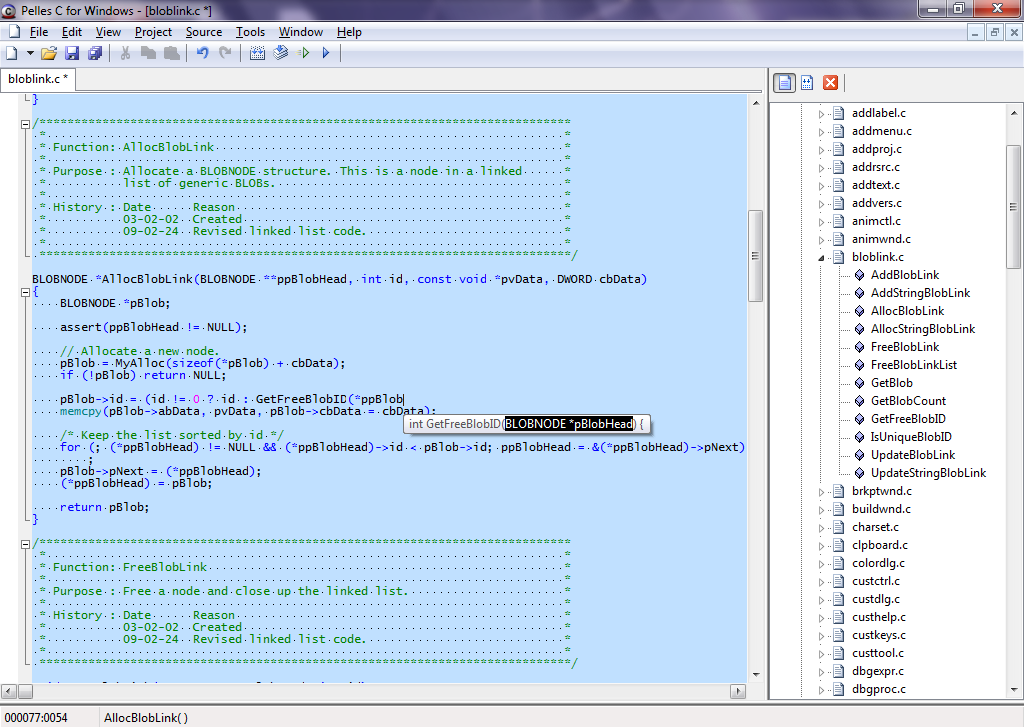
2)Pelles C :

Pelles C is a good free Integrated development Environment for developing C programs.
It is available in both 32 and 64 bit versions with support for Windows 7 64 bit editions.It is a good alternative for the Old 16 Bit Borland Turbo C Compiler(TC).


Pelles C is a lightweight bundle of Integrated features.It can be used it to edit source files, icons, cursors, bitmaps, resource scripts
For More Information on Pelles C Please check out this post http://c-madeeasy.blogspot.in/2011/07/pelles-c-good-ide-supporting-windows-7.html


You can Download Pelles C from http://www.smorgasbordet.com/pellesc/


3)Dev-C++ IDE:


Dev-C++ is an Free IDE by BloodShed Software that can be used to Develop C and C++ Programs
Dev-C++ IDE Supports GCC Based Compilers has Profiling Feature.It is also a good IDE Targeted for C/C++ Development.Dev-C++ supports GCC Based Compilers ,has Code Completion Feature and has Inbuilt Profiling.


You can Download Dev-C++ IDE from http://www.bloodshed.net/devcpp.html

4)Code::Blocks:

Code::Blocks is a  free C/C++ IDE which is Open-source and Cross Platform.The main feature its ability to maintain the look and feel across different platforms.It also has Plugin Support to extend the usability.


You can Download Code Blocks IDE from http://www.codeblocks.org/

Wednesday, May 16, 2012

How to Recover Lost or Forgotten RAR(Winrar) Archive Passwords

RAR Files are common format for compression.It is likely that you forget a Encrypted RAR Password.
RAR Files are secured by strong encryption so it is not easy to recover lost RAR File Passwords.

This Tutorial will teach you how to recover lost RAR File Passwords using a technique called Brute-Force Attack.In this method random passwords of varying length are checked againt the Encrypted Winrar Archive untill the correct password is obtained.This is similar to a person checking possible password,.


Follow these Simple Steps to Recover your Lost RAR File Passwords


1.Download and Install RAR Password Recovery Software from this link  http://www.intelore.com/rar_password_recovery.php


2.Open the Encrypted Archive in RAR Password Recovery


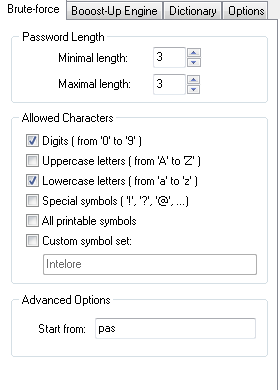
3.Click on the Brute Force Tab and specify the settings,the default settings will check passwords ranging from 0-9 characters and a-z alphabets you can change this.


4.Click on Start Button to start recovery.Once the password is found you will be shown a window with the password


For a Detailed View see the Video Tutorial Below or visit Youtube 
http://www.youtube.com/watch?v=hqNLKqEwUBE


Tuesday, May 1, 2012

How to Restart Windows Explorer after a Crash using Task Manager


Windows Explorer is exposed to frequent crashes and hangs. After explorer hangs you can use Task Manager to End the explorer process but the Start Menu will disappear.To restart explorer follow the simple steps listed below

  • Press Ctrl+Alt+Delete to start Task Manager
  • Click on File>New Process
 
  • Type in explorer and Click Ok
  • Explorer will restart and Start Menu will Reapper

Friday, January 27, 2012

Do you Really need a Tablet?Tablet vs SmartPhone vs Laptop

Tablets have become most common in today's market that people see it as necessary gadget.Have ever you wondered why you need a tablet or Do you even need a tablet?
If you have a laptop or a smartphone do you need to buy a tablet.Get the answers below.


                        Laptop vs Tablet vs SmartPhone


You Should decide if you need one by taking into account of the intended usage.It also depends on you and your habits.


Videos/Multimedia:
Most tablets offer a decent 5-10 Inch Screen Size,which allows you to watch HD Videos,Photos Easily and Comfortably rather than straining your eyes on the small screen of a smartphone.So tablets are way ahead when compared to smartphones in this aspect.But if you have a laptop apart from the portability and ease of use you can watch Videos or HD Content in it.So its your Call.


Document Viewing:
Viewing PDF's and Word Documents are much easier when compared to Smart Phones.But with Touch screen typing in will be a little harder,so here laptop is better if you let go of the portability.


Gaming:
 Tablets are not that into high end games moreover gaming in a touch screen may be a little annoying.


Surfing the Web:
If you have a WIFI Hotspot you can browse the web from anywhere,tablets offers ease of web surfing by allowing you to slide through the webpages with your fingers.Tablets stand out for Web browsing way ahead of laptops and smartphones.


So,The Conclusion?


Can a Tablet replace a Smart Phone?
Yes.Tablets are good alternatives to smartphones if you are looking for a device that is focused for multimedia applications like viewing Videos,Photos , Browsing the Web or Viewing PDF's or E books.

Can a Tablet replace a Laptop?
The answer is a No .You cannot do Programs or Develop applications on a tablet you might also find difficult editing images and Documents on a Touch Screen.But if you are using your laptop for Viewing Videos,Browsing the Internet or Reading E-Books then the Tablet is For you.


Which is the Best Photo Watermarking Software

Photo Theft is becoming more and more common in the web with the outburst of social websites like Facebook,Google Plus and Image sharing se...