Friday, September 28, 2012

Does Microsoft show us a Glimpse of the Future from the Metro Look

Microsoft has always known what its user needs and has attained massive success introducing products which full fills the trend and requirements.It has recently introduced the Windows 8 and  Outlook.Both these products have a common feature the Metro look.

So what is this Metro look and why have they used it?


File:Windows 8 start screen.png


The Metro is a User Friendly Minimalistic and Stylish Graphical User Interface(GUI) Unlike the predecessor Windows versions you can see that there is no Windows start Button and the detailed lists of icons.Everything is clean and minimal.This is a trend that has been absorbed from the growing Android Smartphone and Tablets Market.Windows 8 also aims the users who uses Mobile Devices with touchscreens.The Interface is good and is fluid.

Microsoft has also done a good job with their Online Mail Service,its also been ported to the Metro Look.
Live.com and Hotmail.com has been revamped to the simpler and user friendly Mail Service Outlook.com

These are all very good and the Outlook Mail service is very attractive,Expect it could have been much faster or it could show the loading screen like Gmail do when you open your Mail account.


These all are revolutions in the IT Era-User interfaces are becoming simpler and simpler by time,user hardly needs to do something,its becoming very easy for the naive user.But advanced users might find these simplicity a little annoying as they may be interested to explore Details of the System.

These all make up an Efficient and Intelligent approach  that makes Information Retrival and Information processing a Child's Play and the only doubts remains-Will a time come when computers do all the work that we think of ????

Thursday, August 30, 2012

Java Program to Write Lines of Text to a File + Source Code

To learn the Basics of file manipulation in java ,the best way to start is by writing simple code to write some text to file.The following is a sample program that writes text to file using BufferedWriter Class

It uses the File Class to open the File to the BufferedWriter Class,which writes some sample text to the file.The main class used is the Writer Class intended for writing stream data to files.

Below is the complete source Code to implement a Simple File Writer in Java


 import java.io.*;  
 public class FileWriter {  
  public static void main(String[] args)throws IOException{  
  String towrite = "Hello World";  
  Writer data = null;  
  File file = new File("myfile.txtt");  
  data = new BufferedWriter(new FileWriter(file));  
  data.write(text);  
  data.close();  
  System.out.println("Text Written");   
  }  
 }  

Wednesday, August 8, 2012

How to set the Java Compiler path for direct running from command Line

There is an easy way to set the Java Compiler Path(javac.exe) and Java Interpreter path(java.exe)without typing long lines of command.

The following are steps to set the JDK(Java Development Kit) path easily

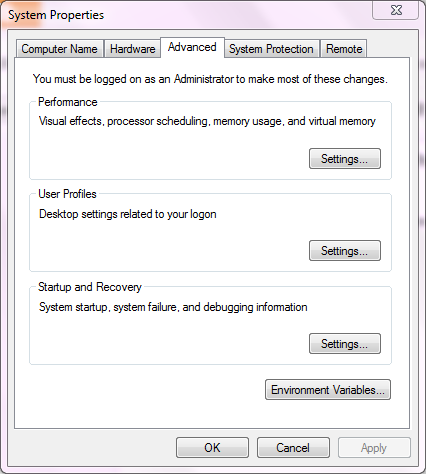
1.Click on Start

2.Right Click on Computer>Properties

3.Click on Advanced System Settings

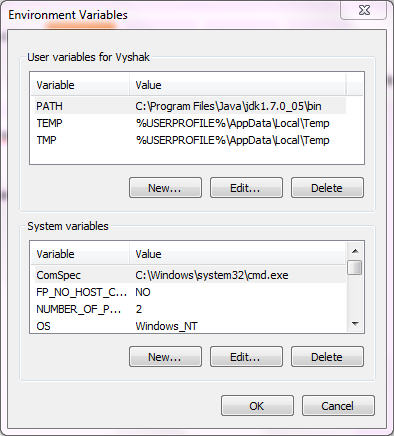
4.Click on Environmental Variables Button


5.Click on New


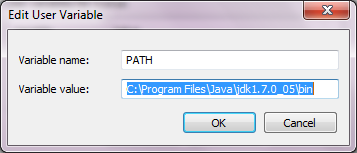
6.In the variable name field type PATH


7.In the variable value field enter the path in which JDK is installed (usually C:\Program Files\Java\jdk1.7.0_05\bin),include the bin folder.

8.Click on OK

9.Open CMD and type javac.exe or java.exe or the name of any executable,it will be launched.

See the video tutorial for more information


Friday, July 27, 2012

Simple Pencil Sketch Java Applet Example+Source Code


Java Applets are easy to Implement Web Programs that can be run on the browser without any installation or downloads. The only requirement is that Java Virtual Machine(JVM) Should be installed on the END User Machine. As you may know Java Applets are OS Independent it can be run on any system supporting Java.
Simple Pencil Sketch Applet in Java
The following is a simple Java Example Applet that draws Lines when a user clicks and Drags the mouse.
It uses mouseMoved, mousePressed events to Track mouse clicks by using the MouseAdapter Motion Listener Class.The following is the screenshot of the Applet


The following is the complete Example Source code for the Pencil Sketch Java Applet
 import java.applet.*;  
 import java.awt.event.*;  
 import java.awt.Graphics;  
 import java.awt.Color;  
 //<applet code=LineDraw.class width=400 height=300> </applet>  
 public class LineDraw extends Applet implements MouseMotionListener  
 {int x1,y1,x2,y2;  
  boolean flag=false;  
 public void init()  
 { x1=0; y1=0;  
  addMouseMotionListener(this);  
  addMouseListener(new MouseAdapter(){  
  public void mousePressed(MouseEvent ME)  
  { x1=ME.getX(); y1=ME.getY();}  
  }  
  );  
 }  
 public void mouseMoved(MouseEvent ME)  
 {showStatus(ME.getX()+","+ME.getY()); }  
 public void mouseDragged(MouseEvent ME)  
 {  
  Graphics g=this.getGraphics();  
  x2=ME.getX();  
  y2=ME.getY();  
  g.drawLine(x1,y1,x2,y2);  
  x1=x2; y1=y2;  
  }  
 }  

Sunday, May 27, 2012

.Net 4.5-The End of Microsoft .Net Framework Client Profile


Microsoft had introduced 2 Variants of the .net Frameworks till .Net Framework Version 4,the Complete Framework and the Client Profile which was only a subset of the the Complete Framework.

Why did Microsoft do it?

Since the Complete Framework had a large size Microsoft did not want the END user's to consider it annoying to download the complete framework to run applications developed in .Net.
Certain software's only used some parts of the framework.So client profile was created as a subset of the .Net Framework complete Edition.The client Profile did not support ASP.Net and the Advanced Web Programming.

Was Client Framework a Success?

The Straight forward answer is 'NO'.If you ask why just compare the size of the two packages.

 .NET Framework 4 32BIT + 64 bit Full  - 48.1 MB
 .NET Framework 4 Client Profile-   41.0 MB

Just a 7MB Difference.So this is where it failed,the users will find it comfortable to download the full framework as the sizes have a small difference.This also created confusion among common users regarding the different terms used.

But with the Release of the .NET Framework 4.5 Microsoft is putting an End to the Client Framework model.Microsoft has mentioned about this in their MSDN Article http://social.msdn.microsoft.com/search/en-us?query=compact+&x=0&y=0

Quoting from MSDN

Starting with the .NET Framework 4.5, the Client Profile has been discontinued and only the full redistributable package is available. Optimizations provided by the .NET Framework 4.5, such as smaller download size and faster deployment, have eliminated the need for a separate deployment package. The single redistributable streamlines the installation process and simplifies your app's deployment options.
 Thus us Developers and END Users will find it comfortable to download a single version rather than getting confused with all different versions around.


Saturday, May 26, 2012

The Best 4 Free IDEs for coding programs in C Language

C Language is the Base for all Softwares existing today,it is a powerful language for programming applications which require Low Level System Functions.The Object oriented successor of C is C++ which is considered much easier to program when compared to C because of its Object Oriented Nature.


It is Necessary for Every Programming Aspirant to learn C Language and C should be the primary language you learn because future languages apart from Functional Languages most Imperative Programming Languages use the structure similar to C.


There are Several Powerful and Completely free IDEs(Integrated Development Environments) Available for Developing C Programs which can be simultaneously used for other languages like C++.


Given Below is a List of the Best 4 Free IDEs for Developing Programs using the C Programming Language.


1)Eclipse-CDT(C/C++ Development Tooling):

Eclipse is Popular IDE for Developing Java Applications.It is mainly used for Developing Android Applications by Integrating the Android Plugin. Eclipse IDE has its C/C++ Counterpart called Eclipse CDT Which can be used to Develop both C and C++ Programs.The main feature of CDT is Code refactoring and Syntax Highlighting.


You can Download Eclipse CDT from http://www.eclipse.org/cdt/


2)Pelles C :

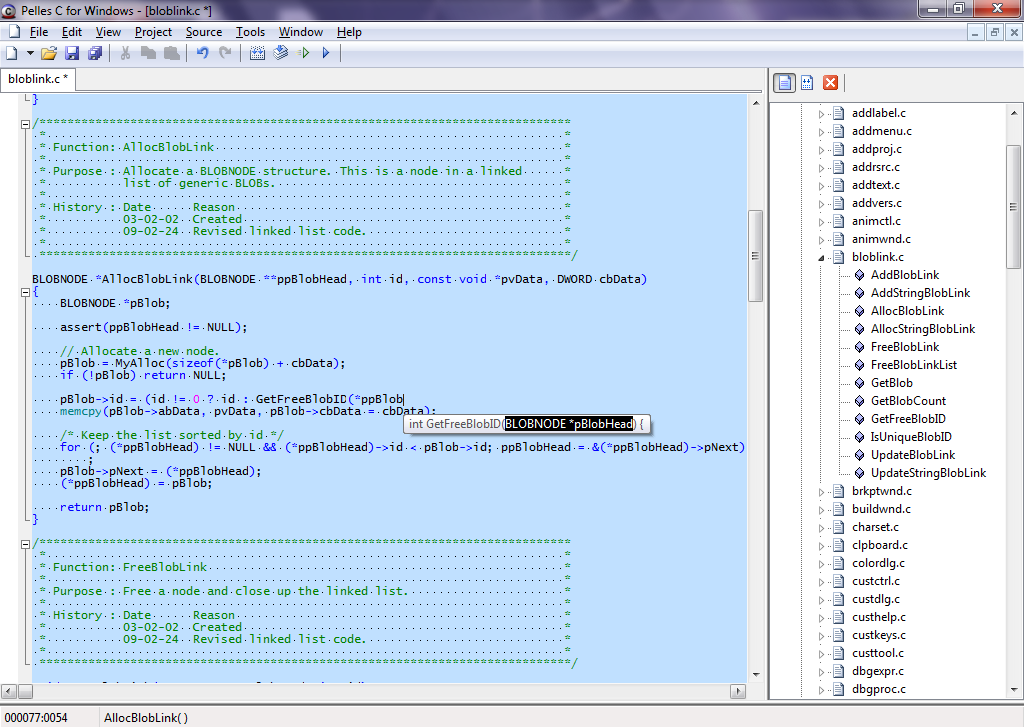
Pelles C is a good free Integrated development Environment for developing C programs.
It is available in both 32 and 64 bit versions with support for Windows 7 64 bit editions.It is a good alternative for the Old 16 Bit Borland Turbo C Compiler(TC).


Pelles C is a lightweight bundle of Integrated features.It can be used it to edit source files, icons, cursors, bitmaps, resource scripts
For More Information on Pelles C Please check out this post http://c-madeeasy.blogspot.in/2011/07/pelles-c-good-ide-supporting-windows-7.html


You can Download Pelles C from http://www.smorgasbordet.com/pellesc/


3)Dev-C++ IDE:


Dev-C++ is an Free IDE by BloodShed Software that can be used to Develop C and C++ Programs
Dev-C++ IDE Supports GCC Based Compilers has Profiling Feature.It is also a good IDE Targeted for C/C++ Development.Dev-C++ supports GCC Based Compilers ,has Code Completion Feature and has Inbuilt Profiling.


You can Download Dev-C++ IDE from http://www.bloodshed.net/devcpp.html

4)Code::Blocks:

Code::Blocks is a  free C/C++ IDE which is Open-source and Cross Platform.The main feature its ability to maintain the look and feel across different platforms.It also has Plugin Support to extend the usability.


You can Download Code Blocks IDE from http://www.codeblocks.org/

Tuesday, May 22, 2012

Program to Implement Selection Sort in Java+Explanation


Selection sort is said to be an efficient algorithm when considering small computations involving limited memory/resource but it is quite inefficient when compared to other techniques when huge computations are required.Selection sort is said to be efficient for small list of items because of its simplicity.

The following steps Explains the working of the Selection sort Algorithm


  1. Obtain the Item with the Minimal value from a List/Collection of items
  2. Swap the item with the Item in the first position of the Collection/List
  3. Repeat the Process for the rest of the Items in the Collection


The Following is the Complete Program Source Code in Java for Implementing Selection Sort Algorithm
 import java.io.*;
import java.lang.*;
class array
{
 DataInputStream get;
 int a[];
 int i,j,n;
 void getdata()
 {
 try
  {
   get=new DataInputStream(System.in);
   System.out.println("Enter the limit");
   n=Integer.parseInt(get.readLine());
   a=new int[n];
   System.out.println("Enter the elements in the array");
   for(i=0;ia[j])
   {
    temp=a[i];
    a[i]=a[j];
    a[j]=temp;
   }
  }
 }
 System.out.println("Elements in ascending order is:");
 for(i=0;i=0;i--)
 System.out.print(" "+a[i]);
 }
}
class selectionsort
{
 public static void main(String arg[])
 {
  array obj=new array();
  obj.getdata();
  obj.sorting();
 }
}

Which is the Best Photo Watermarking Software

Photo Theft is becoming more and more common in the web with the outburst of social websites like Facebook,Google Plus and Image sharing se...